


MSI MEG X870E ACE MAX | Placa Base
Verfügbarkeit für Abholungen konnte nicht geladen werden
Laufende Kampagnen
Liefertermin
Liefertermin
Garantie
Garantie
MSI CARE PLUS
DEIN MSI-GERÄT KANNST DU ZU GERINGEN KOSTEN DURCH MSI CARE PLUS ABSICHERN. MSI BIETET DIR DAMIT EINE GARANTIE AUCH ÜBER DEN ZEITRAUM DER STANDARDGARANTIE HINWEG. ZU DEN VORTEILEN GEHÖREN:
- Weniger als 10 EUR/Monat für eine Garantieverlängerung von einem Jahr.
- VVorrangige Reparaturabwicklung.
- Abdeckung von Hardware-Reparaturen inkl. Austausch von Teilen..
- Direkter Support von einem MSI-Experten.
- kiuugjhDas Garantieverlängerungspaket ist verfügbar für nicht überholte oder runderneuerte Produkte die ab 2021 gekauft wurden.
- Die MSI-Garantieverlängerung kann nur für Kunden gewährt werden, die das MSI-Produkt in Deutschland gekauft haben.
- Es ist ein Kaufbeleg des MSI-Geräts erforderlich. Dies kann eine Kopie der Rechnung oder ein Kaufbeleg sein.
- Dein Produkt muss registriert sein und die Garantieverlängerung muss innerhalb eines Monats nach ihrem Erwerb online aktiviert werden.
- Wenn das erweiterte Garantiepaket nach dem Kauf nicht registriert und aktiviert wird, kann es innerhalb von 14 Tagen nach dem Kauf zurückgegeben werden.gf
SCHRITT 1
WERDE MSI-MITGLIED
Besuchen Sie das MSI Member Center unter https://account.msi.com/login und klicken Sie auf „Mitglieder“. | Befolgen Sie die Anweisungen auf der Website, um MSI-Mitglied zu werden.
SCHRITT 2
REGISTRIERE DEIN MSI-PRODUKT
Melden Sie sich auf der MSI-Mitgliederseite an und klicken Sie im linken Menü auf „Produktregistrierung“, um Ihr Produkt zu registrieren, indem Sie die entsprechenden Informationen ausfüllen. Wenn Sie Ihr Produkt bereits registriert haben, fahren Sie mit Schritt 3 fort.
SCHRITT 3
AKTIVIERE DIE GARANTIEVERLÄNGERUNG
Gehen Sie zum MSI Member Center, klicken Sie im linken Menü auf „MSI Care Plus aktivieren“ und führen Sie die folgenden Schritte aus:
1. Wählen Sie das registrierte Produkt aus, für das Sie eine erweiterte Garantie erhalten möchten.
2. Geben Sie den Servicecode und das aktive Passwort von der von Ihnen erworbenen digitalen Garantieverlängerungskarte ein.
3. Klicken Sie auf „Aktivieren“, um den Vorgang abzuschließen.

MSI MEG X870E ACE MAX | Placa Base
Free Package
- AM5
- AMD X870
- ATX
MEG X870E ACE MAX
Características:
- Compatible con procesadores de PC de sobremesa AMD Ryzen™ series 9000/8000/7000
- Compatible con memoria DDR5, doble canal DDR5 8400+ MT/s (OC)
- Rendimiento Ultra: sistema de alimentación Duet Rail 18+2+1, SPS de 110 A, OC Engine, conectores de alimentación de CPU de 8 pines dobles, Core Boost, Memory Boost, PCB de 8 capas fabricado con cobre de 2 oz de grosor y material de nivel de servidor.
- Frozr Guard: diseño de aletas onduladas, tubo de calor Direct Touch Cross, placa base MOSFET, almohadillas térmicas de 9 W/mK, blindaje M.2 de doble cara Frozr y software Frozr AI que garantizan el máximo rendimiento con baja temperatura.
- EZ DIY: EZ PCIe Release, EZ Magnetic M.2 Shield Frozr II, EZ M.2 Clip II, EZ Antenna y EZ Conn-Design.
- Ultra Connect: LAN 10G + LAN 5G, solución Wi-Fi 7 a máxima velocidad, USB4 y BIOS ROM de 64 MB: la última solución para uso profesional y multimedia, que ofrece una red y una transmisión de datos seguras, estables y de alta velocidad.
- Experiencia gaming ultrarrápida: ranuras PCIe 5.0, 5 conectores M.2 integrados con solución Lightning Gen 5, USB 20G frontal con suministro de energía USB de 60 W.
- Audio Boost 5 HD: la solución de audio definitiva con el último procesador de audio ALC4082 de alta calidad, que combina el DAC de audio ESS y el amplificador para ofrecer una experiencia impresionante.
| Chipset | AMD X870E |
| CPU | Supports AMD Ryzen™ 9000/ 8000/ 7000 Series Desktop Processors Socket AM5 |
| Memory |
4x DDR5 UDIMM, Maximum Memory Capacity 256GB Ryzen™ 9000 Series Processors max. overclocking frequency:
Supports AMD POR Speed and JEDEC Speed * The DIMM slots on this motherboard only have single-sided latches. |
| Onboard Graphics |
* Available only on processors featuring integrated graphics. |
| Slot |
* PCI_E3 & M.2_1 share the bandwidth. M.2_1 will run at x2 speed when installing device in the PCI_E3 slot. You can switch PCI_E3 slot to x4 in the BIOS, but this will disable the M.2_1 slot. |
| Audio | Realtek® ALC4082 Codec + ESS9219Q Combo DAC/HPA 7.1-Channel USB High-Performance Audio Supports S/PDIF output Supports up to 32-Bit/384 kHz playback on front panel |
| Storage |
* The M2_2 slot will be unavailable when using Ryzen™ 8500/ 8300 Series processors. |
| RAID |
*RAID 5/ 10 configuration is only supported by Ryzen™ 9000/ 7000 series processors. |
| USB |
* USB 40Gbps Type-C ports on the back panel only run PCIe 4.0 x2 when install Ryzen™ 8500/ 8300 Series processors. |
| LAN |
|
| Internal IO |
|
| WIRELESS LAN & BLUETOOTH |
* 6GHz band support may depend on every country’s regulations and Wi-Fi 7 will be ready in Windows 11 SV3. |
| LED FEATURE |
|
| BACK PANEL PORTS |
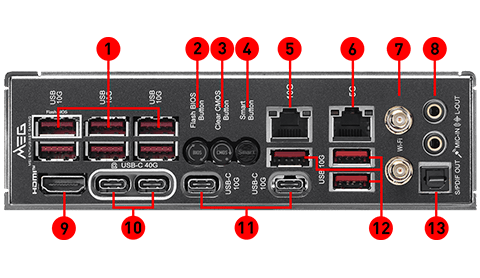
|
| OPERATING SYSTEM | Support for Windows® 11 64-bit |
| BOX CONTENT | 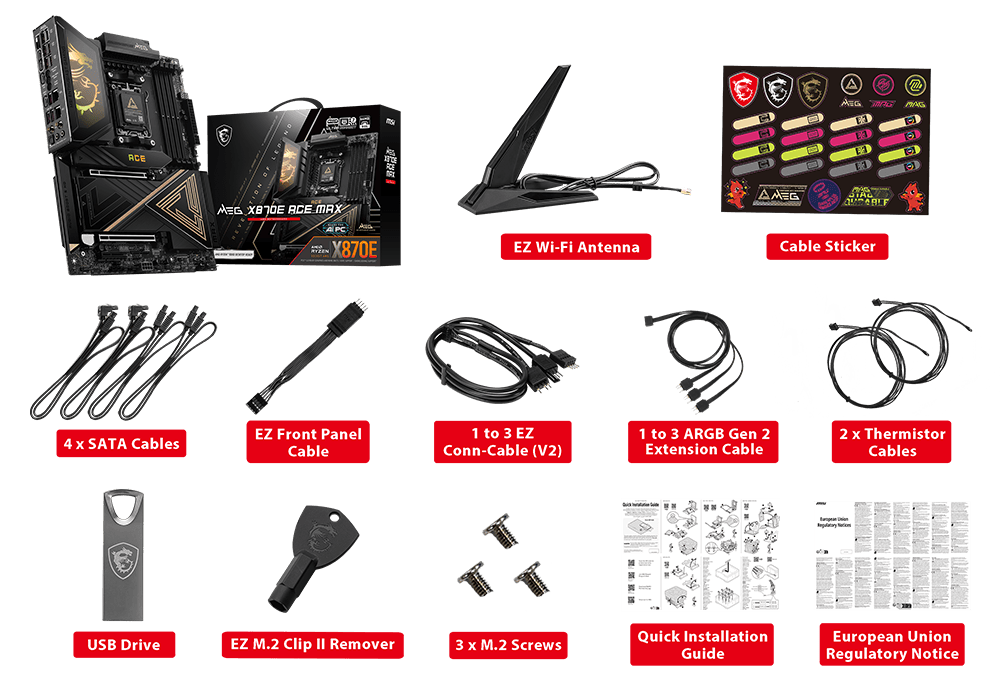 |
| PCB Info | ATX 243.84mmx304.8mm |